
Best Content Marketing Platforms to Boost Brand Awareness in 2026
Dec 10, 2025
Let’s face it—creating content in 2026 isn’t just about writing a few blog posts and hitting publish.
The digital world is exploding with information, and your brand can easily get lost in the noise.
That’s where the best content marketing platforms come into play.
These tools are more than just fancy dashboards; they’re the foundation of a strong marketing strategy that boosts your visibility on search engines, helps manage content workflows, and ensures every piece of content actually delivers results.
Whether you're a solo content creator, part of a growing marketing team, or managing a large-scale digital campaign, the right platform will streamline your efforts.
From SEO optimization with tools like Ahrefs and Semrush, to AI-powered brainstorming with ChatGPT, these platforms combine analytics, automation, and management features to keep your content relevant, engaging, and aligned with your goals.
In this guide, we’ll walk you through everything from what a content marketing platform is to which tools dominate the scene in 2026.
Expect deep dives into popular platforms like HubSpot, Canva, WordPress, and more.
Ready to take your content marketing game to the next level? Let’s get started.
Table of Contents
What is a Content Marketing Platform?
A content marketing platform (CMP) is your all-in-one toolbox for planning, creating, distributing, and analyzing content. Think of it as a digital command center—where creativity meets strategy.
These platforms are designed to manage every stage of the content lifecycle, from brainstorming ideas to publishing them across channels, and finally to measuring performance using real-time analytics.
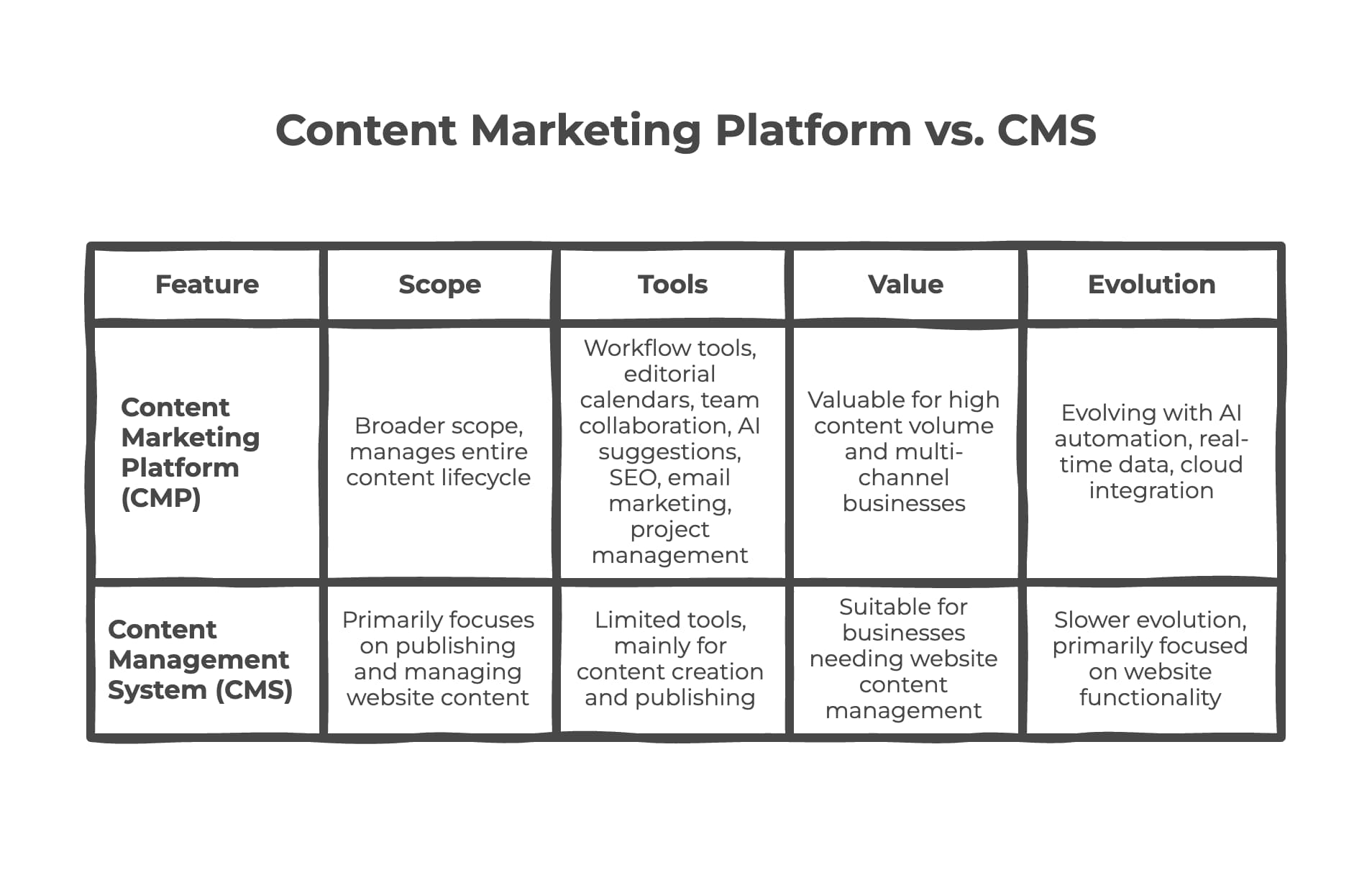
So, how’s that different from a CMS like WordPress? While a CMS focuses primarily on publishing and managing website content, CMPs cover a broader scope.
They include workflow tools, editorial calendars, team collaboration features, and even AI-driven content suggestions. With integrated SEO tools, email marketing, and project management, CMPs give you a bird’s-eye view of your content efforts.
CMPs are especially valuable for businesses that produce high volumes of content or operate across multiple channels—like social media, email, and blogs. They enable teams to align their messaging, optimize for search engines, and maintain consistency in tone, design, and branding.
With increasing demand for personalized content, CMPs are evolving with features like AI automation, real-time data insights, and integration with cloud platforms such as Dropbox and OneDrive.
Why You Need a Content Marketing Platform
Ever felt overwhelmed by scattered Google Docs, endless email threads, and unclear content calendars? You’re not alone. The modern content marketer juggles a dozen tools, teams, and targets—and without a centralized platform, things can get messy fast. That’s where a CMP steps in and saves your sanity.
First, it helps organize your workflow—from content requests to approvals, and from design to publishing. You can assign tasks, set deadlines, and monitor progress in one place. No more chasing updates across Slack, email, and spreadsheets.
Second, CMPs provide actionable insights using built-in analytics. You can track how each piece performs, whether it's a blog post, video, or social post. Which content drives traffic? What’s leading to conversions? What needs improvement? All of this data helps refine your content strategy.
Third, many CMPs come with SEO, email marketing, and automation features baked in. For instance, you can publish a blog, schedule it across social channels, send a related email campaign, and monitor conversions—all from a single dashboard.
Lastly, a CMP boosts collaboration. Writers, designers, editors, and marketers can work in sync, leave feedback, and avoid versioning nightmares. Think of it as the glue that holds your digital marketing infrastructure together.
Features to Look for in the Best Content Marketing Platforms
Not all content marketing platforms are created equal. Some shine at SEO optimization, while others are brilliant for team collaboration, automation, or email marketing. But if you're serious about choosing the best content marketing platform, you need to understand the features that actually move the needle.
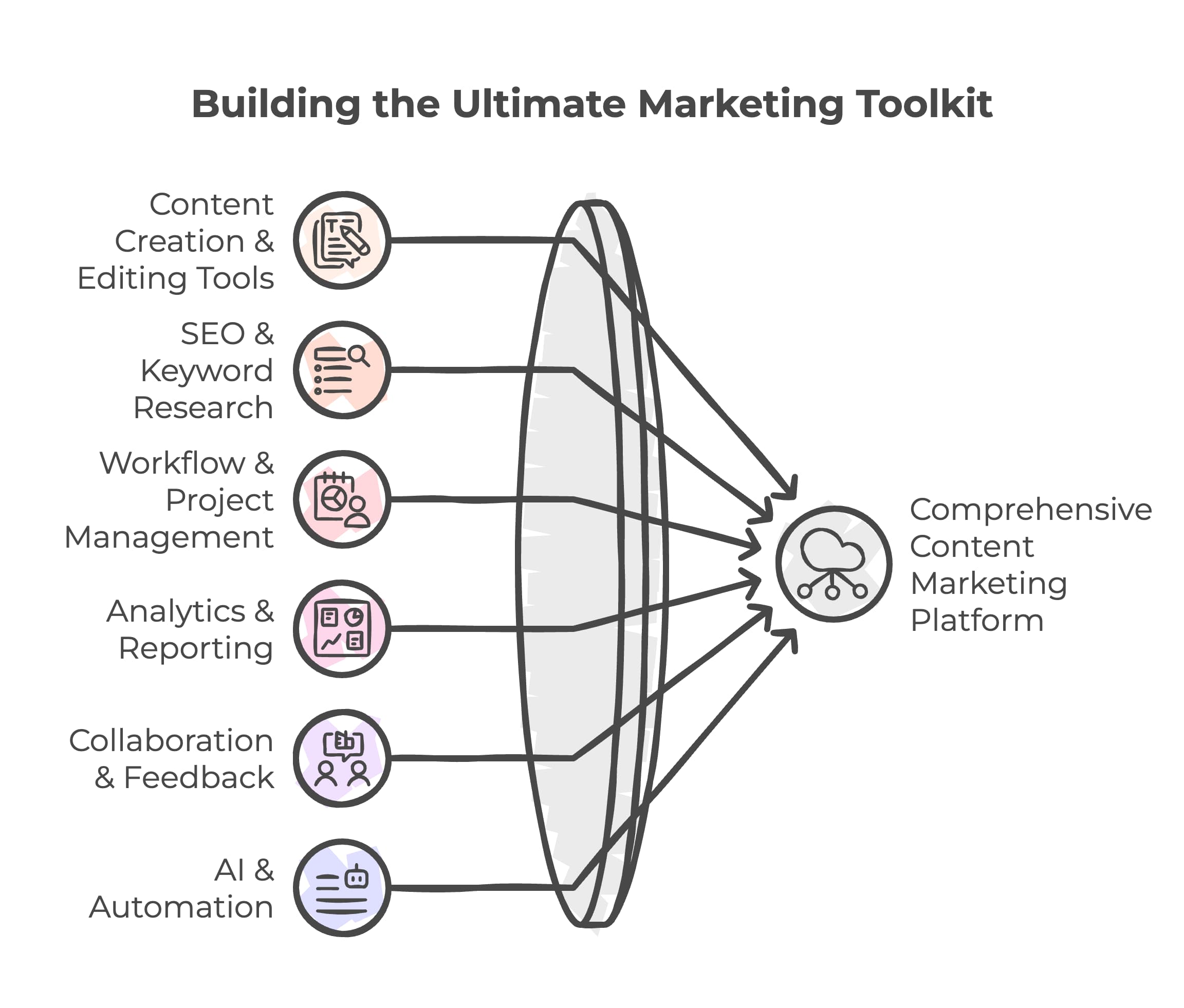
Let’s break down the essentials:
1. Content Creation & Editing Tools
Your platform should make it easy to create, edit, and format content. Whether you're crafting a blog post, an infographic, or a social media caption, built-in editors (like the one in HubSpot or WordPress) should offer flexibility and user-friendliness. AI writing tools such as ChatGPT integrations or smart templates can boost creativity and reduce turnaround time.
2. SEO & Keyword Research Integration
You can’t talk content without talking about search engine optimization. Look for platforms that integrate with tools like Semrush, Ahrefs, Yoast SEO, or even Google Search Console. Features such as real-time SEO scoring, keyword suggestions, backlink tracking, and SERP analysis are crucial for improving search engine visibility and ranking.
3. Workflow & Project Management
A good platform should double as a project management tool, especially for larger teams. Think Kanban boards, content calendars, task assignments, and automated notifications. Platforms like Trello or Asana, when integrated, make managing campaigns and deadlines much easier.
4. Analytics & Reporting Dashboards
How do you know if your content is actually working? Through solid data. The best platforms provide detailed analytics on traffic, engagement, bounce rates, and conversion metrics. Bonus points if it integrates with Google Analytics or HubSpot Analytics to give a 360-degree view of content performance.
5. Collaboration & Feedback Tools
Content is a team sport. You need smooth collaboration between writers, designers, editors, and strategists. Look for platforms that allow real-time comments, version control, and approval workflows. This keeps things moving without endless email threads or duplicated documents.
6. AI & Automation Capabilities
Modern CMPs use artificial intelligence to enhance productivity. AI can suggest topics, rewrite content, analyze tone, or even summarize documents. Platforms powered by large language models (like GPT-4) help you work smarter. Automation features—like publishing schedules, social sharing, or email campaign triggers—save time and eliminate manual errors.
7. Integration with Cloud Storage & CMS
Your platform should play nicely with others—especially tools you already use. Dropbox, OneDrive, Google Drive, and WordPress integrations let you pull assets, save versions, or publish directly to your site. This seamless connection improves workflow and organization.
8. Email Marketing Integration
Email remains a powerhouse for nurturing leads. The best platforms allow you to create, automate, and analyze email campaigns. Whether it's a monthly newsletter, product update, or drip campaign, tools like Mailchimp or HubSpot make it happen effortlessly.
9. Social Media Scheduling & Monitoring
If your platform doesn’t support social media management, it's not future-ready. Look for cross-platform scheduling, analytics, and even social listening tools. This keeps your brand consistent and your audience engaged on every platform.
10. Pricing, Scalability & Customer Support
Lastly, consider the cost. Some platforms offer tiered pricing based on features, storage, or users. Make sure you’re not paying for tools you won’t use. Also, check if the platform scales with your team’s growth and offers responsive customer service when you hit roadblocks.
Benefits of Using Content Marketing Platforms
If you’re still on the fence about investing in a content marketing platform, let’s talk about the real benefits—what you’ll actually get out of it. Because this isn't just about managing blog posts—it's about supercharging your entire marketing strategy, driving real ROI, and working smarter.
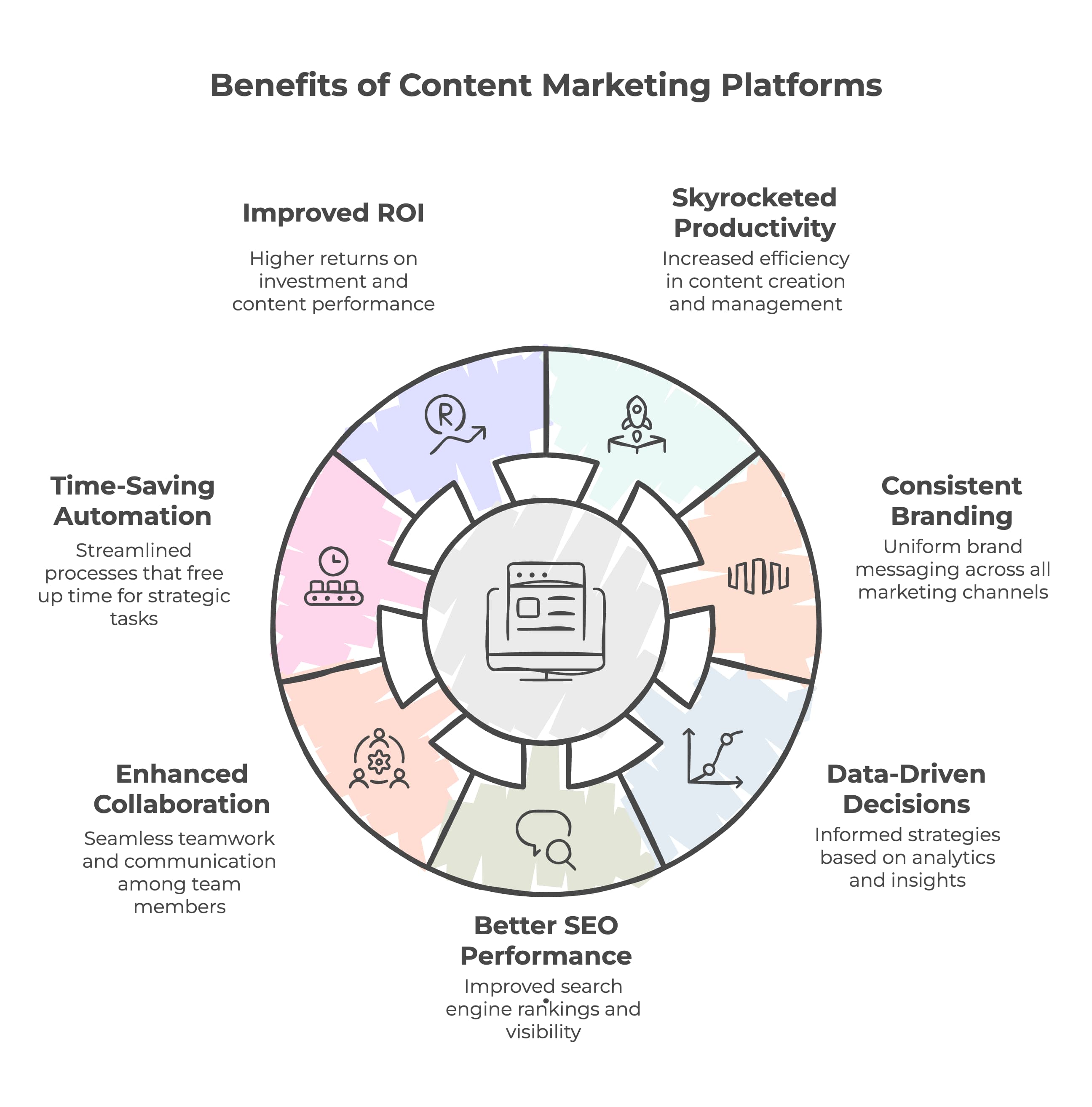
1. Skyrocketed Productivity
No more juggling between Google Docs, Trello, Slack, and five other tabs. CMPs bring everything into one workspace—tasks, deadlines, assets, calendars. This streamlined environment cuts down time spent searching, switching, or syncing. You get more done, with less hassle.
2. Consistent Branding Across Channels
Imagine your brand voice being polished and consistent across blog posts, social media, email, and landing pages. CMPs help maintain brand identity by using templates, approval workflows, and centralized asset libraries (hello, Canva + Dropbox). Your messaging stays clear, on-point, and recognizable.
3. Data-Driven Decision Making
When every piece of content is tracked—views, clicks, shares, conversions—you gain powerful insights into what’s working. CMPs feed you this data through intuitive analytics dashboards, often integrating with Google Analytics or HubSpot. This lets you pivot fast, focus on high-performing content, and adjust your content strategy in real time.
4. Better SEO Performance
With built-in or integrated SEO tools, CMPs help optimize content from the start. Keyword research tools (like Semrush, Ahrefs), on-page SEO checkers (Yoast SEO), and content scoring make sure you’re always aligned with search engine algorithms. That means more organic traffic, backlinks, and visibility on the SERP.
5. Enhanced Team Collaboration
Whether you’re a team of 2 or 200, CMPs eliminate silos. Everyone—from writers to designers to the CMO—can leave comments, review progress, and get feedback without endless email threads. Integration with cloud storage tools like OneDrive and Google Drive ensures easy access to content assets.
6. Automation that Saves Time
Why manually post a blog at 9 AM when your platform can schedule it for you? Or copy/paste email content when it can be automated into a sequence? CMPs use automation workflows to save time, reduce errors, and ensure consistency. Tools like HubSpot or Mailchimp let you set it and forget it—smartly.
7. Improved ROI & Content Performance
Ultimately, it’s about results. Whether your goal is to generate leads, increase brand awareness, or boost sales, CMPs help optimize every step of the content journey. From ideation to publishing to analyzing outcomes, you’ll always know where your investment is paying off—and where it’s not.
HubSpot: All-in-One Powerhouse
When it comes to content marketing platforms, HubSpot is like the Swiss Army knife of the digital marketing world. It's a full-suite, cloud-based platform that offers everything from CRM, email marketing, and SEO optimization, to blog creation, landing pages, and even sales automation. If you’re serious about aligning your marketing strategy with business goals and scaling growth, HubSpot should be high on your list.
Why HubSpot Stands Out
One of HubSpot’s strongest suits is its seamless integration between marketing, sales, and customer service. You can create a blog post, optimize it with on-page SEO tools, schedule it for social sharing, push it through an email sequence, and track the conversions—all within one dashboard. That's not just convenient; it's a content marketer’s dream come true.
The drag-and-drop email builder, combined with powerful automation workflows, allows you to nurture leads without lifting a finger. Plus, its analytics dashboard is beginner-friendly yet robust enough for data geeks. You can measure click-through rates, form submissions, bounce rates, and even assign ROI to specific pieces of content.
Key Features:
-
Built-in SEO tools for keyword optimization
-
Smart content personalization for different audience segments
-
Detailed analytics and reporting
-
CRM integration for tracking leads and sales
-
Automated email campaigns and social media scheduling
-
Blog post and landing page builder with real-time suggestions
-
Integration with Google Analytics, Salesforce, Slack, and more
Best Use Cases:
-
Email marketing campaigns
-
Blog and landing page creation
-
Lead nurturing through content
-
Team collaboration for medium to large enterprises
Pros:
-
Everything in one place
-
Great support and documentation
-
Scalable for businesses of any size
-
Excellent for both B2B and B2C content strategies
Cons:
-
Can be pricey as you scale up
-
May have a steep learning curve for beginners
Whether you're creating white papers, product pages, or launching a newsletter, HubSpot ensures that everything you do is data-backed, brand-aligned, and optimized for success. With HubSpot, your content doesn’t just sit on a page—it works for you, helping attract, engage, and convert your target audience.
Semrush: King of SEO and Competitor Analysis
If your content strategy starts with search engine optimization, then Semrush is the go-to platform. Semrush has earned its stripes as one of the most powerful tools for keyword research, backlink analysis, competitor research, and content optimization.
What Makes Semrush Indispensable
Semrush isn’t just about SEO—it’s about strategic content planning. With its Topic Research tool, you can uncover what your audience is searching for, what’s trending, and where your competitors are gaining ground. It also shows you search volume, keyword difficulty, and search intent, which are crucial in today's user-focused Google algorithm updates.
Its Content Marketing Toolkit allows you to plan, write, and audit content in a way that aligns with your SEO goals. You can track SERP rankings, monitor competitor blogs, and even check the readability and structure of your own articles. Add in integration with Google Analytics and Yoast SEO, and you’ve got a holistic view of your content’s performance.
Top Features:
-
Keyword Magic Tool for finding low-competition keywords
-
Backlink analytics and domain authority tracking
-
SERP position tracking and rank history
-
Competitor gap analysis
-
Content idea generation and audit tools
-
Integration with Google, WordPress, Yoast SEO, and Google Search Console
Perfect For:
-
SEO-focused blogs
-
Competitor research and strategy
-
Agencies managing multiple clients
-
Marketing teams focused on organic growth
Pros:
-
Accurate, real-time SEO data
-
Excellent tools for competitor analysis
-
User-friendly dashboard with detailed reports
-
Helps identify content gaps and opportunities
Cons:
-
Monthly plans can be expensive for freelancers
-
Feature-rich interface may overwhelm beginners
Semrush isn’t just a tool—it’s your SEO expert in a box. If your goal is to dominate the search engine results page (SERP), uncover backlinks, and develop a content strategy rooted in solid research, Semrush is a must-have in your arsenal.
Ahrefs: Backlink and SEO Intelligence Tool
If backlinks are the backbone of your SEO strategy (and they should be), Ahrefs is the heavyweight champion. Known for having one of the most robust backlink databases on the planet, Ahrefs lets you spy on your competitors, track your SEO performance, and improve your organic visibility with razor-sharp accuracy.
Why Ahrefs Matters
Ahrefs goes deep—really deep—into search engine optimization. From tracking which sites link to your content, to monitoring keyword rankings across different countries, it provides all the SEO intelligence you could need.
One standout feature is the Content Explorer. Plug in a keyword, and Ahrefs will show you the most shared and linked-to content in your niche. You can even filter it by domain authority, word count, referring domains, and more. This makes it a fantastic tool for developing content that not only ranks but also earns natural backlinks.
Their Site Audit tool is also a beast. It scans your website for over 100+ SEO issues—from slow-loading pages to broken internal links—so you can keep your technical SEO in top shape.
Main Features:
-
Real-time backlink monitoring
-
Site audit for technical SEO fixes
-
Keyword research and difficulty scores
-
SERP history and content gap analysis
-
Competitor tracking and comparison
-
Extensive tutorials and learning academy
Best For:
-
SEO agencies
-
Link-building strategists
-
Bloggers focused on organic traffic
-
Content marketers doing deep research
Pros:
-
Extremely detailed SEO data
-
Easy-to-use interface
-
Great for finding content opportunities
-
Industry-leading backlink tracking
Cons:
-
Limited project slots on lower plans
-
Focused more on SEO than full content management
Ahrefs is an ideal choice if you want to go beyond content creation and dig into the technical infrastructure of your site’s SEO. If you're aiming for long-term visibility, domain authority, and ranking domination, this tool is your best friend.
Canva: Design-Centric Content Creation Platform
In the world of content marketing, visuals matter—a lot. That's where Canva comes into play. Whether you're a graphic designer, a blogger, or a marketer with zero design experience, Canva lets you create beautiful, on-brand graphics without needing Photoshop-level skills. And in today’s scroll-happy, image-driven online world, Canva has become an essential part of many content strategies.
Why Canva is a Game-Changer for Marketers
We all know that attention spans are shrinking, and walls of text just don’t cut it anymore. Your content—whether it's on social media, a landing page, or in a white paper—needs compelling visuals to stand out. Canva makes it ridiculously easy to design everything from Instagram posts to infographics, presentations, email headers, and even video thumbnails.
But Canva isn’t just for images. It’s a full content creation suite, complete with templates, brand kits, AI-powered design suggestions, and collaborative tools. Teams can comment in real time, suggest changes, and export final files to cloud platforms like Dropbox or OneDrive. It also integrates seamlessly with tools like HubSpot, Trello, and even social platforms for instant publishing.
Key Features:
-
Thousands of customizable templates (social media, blog graphics, email banners, presentations)
-
Built-in stock photos, videos, and audio
-
Real-time collaboration with team members
-
AI design tools like Magic Resize, Brand Voice, and content planning
-
Easy integration with Dropbox, Google Drive, HubSpot, and Slack
-
Mobile app for design on the go
Best Use Cases:
-
Social media graphics and campaigns
-
Blog and newsletter visuals
-
Video content thumbnails and reels
-
Presentations and white papers
-
Design assets for branding
Pros:
-
Extremely easy to use—even for beginners
-
Saves time with templates and drag-and-drop tools
-
Great for brand consistency with kits and saved styles
-
Affordable pricing with a generous free plan
Cons:
-
Not ideal for ultra-complex graphic design projects
-
Offline use is limited
Whether you’re building brand awareness or just want your posts to pop, Canva gives you the design power you need—without the hefty designer fees. It’s a must-have asset in any content marketing workflow, helping bridge the gap between creativity and execution.
ChatGPT + Content Marketing Workflows
Enter ChatGPT—the AI-powered writing assistant that has taken the content marketing world by storm. From brainstorming blog topics to drafting long-form articles, editing newsletters, and even optimizing for SEO, ChatGPT can fit into almost any stage of your content process. It’s not just about automating content—it’s about augmenting human creativity.
Where ChatGPT Shines in Content Marketing
Say goodbye to writer’s block. One of the biggest challenges in content marketing is ideation—coming up with fresh, relevant, and engaging ideas consistently. ChatGPT helps you generate ideas based on trending keywords, target audience personas, and even your competitors’ strategies.
But it doesn’t stop at ideas. You can feed ChatGPT an outline, and it’ll produce high-quality drafts that are SEO-optimized, readable, and on-brand. Need a meta description for your blog? Want a catchy subject line for your email? Need help writing a product landing page? ChatGPT has your back.
Combine that with integrations into platforms like Dropbox, Google Docs, and Notion, and you’ve got a smart, AI-powered partner that fits right into your content stack.
Use Cases:
-
Blog writing and long-form content
-
Social media post drafts
-
Email copy and newsletter content
-
White paper and eBook outlines
-
Content repurposing (e.g., turn a blog into a LinkedIn post)
Key Features:
-
Natural language generation powered by large language models
-
SEO assistance (with the right prompts)
-
Custom tone and brand voice options
-
Integration with content management platforms
-
Plugin and API support for automation
Pros:
-
Speeds up content production dramatically
-
Ideal for brainstorming and content repurposing
-
Reduces overhead for small teams and solo creators
Cons:
-
Still needs human editing for nuance, brand tone, and fact-checking
-
Risk of over-relying on AI-generated content
When paired with human oversight, ChatGPT becomes a content marketing super tool. It improves productivity, enhances creativity, and gives you a competitive edge in the crowded digital space.
Trello & Asana: Workflow and Project Management
No matter how great your content is, if your workflow is a mess, it won’t perform. Tools like Trello and Asana help you bring structure and clarity to your content process. They are not content marketing platforms per se, but they are essential project management tools that every marketing team should be using.
Why Project Management Matters in Content Marketing
Content marketing involves multiple moving parts—research, writing, editing, graphic design, publishing, and promotion. Without a system to track progress, assign tasks, and meet deadlines, things fall through the cracks. That’s where Trello and Asana come in.
Trello’s visual boards (think drag-and-drop cards on a Kanban board) are excellent for managing editorial calendars, brainstorming sessions, and feedback loops. You can assign team members, set due dates, add checklists, and even attach documents from Google Drive or Dropbox.
Asana takes things further with timeline views, automation rules, and detailed reporting. It’s ideal for larger teams who need visibility across multiple projects and campaigns.
Top Features:
-
Task assignment and team collaboration
-
Due date and milestone tracking
-
Integration with Google Calendar, Slack, Dropbox, and more
-
Real-time notifications and status updates
-
Custom templates for content workflows
Best Use Cases:
-
Editorial content calendars
-
Campaign planning and tracking
-
Assigning tasks to writers, designers, and editors
-
Monitoring progress and bottlenecks
Pros:
-
Streamlines workflow and boosts accountability
-
Easy to onboard new team members
-
Improves visibility into content production timelines
Cons:
-
Not a full CMS—needs to be used with content platforms
-
Overkill for solo creators with simple content plans
When your strategy is strong but your execution is weak, these tools help connect the dots. Trello and Asana are like the project managers that keep your content machine running smoothly—on time, every time.
WordPress with Yoast SEO: CMS for Bloggers and Brands
When it comes to content management systems, WordPress is the undisputed king. Powering over 40% of websites on the internet, it’s a flexible, open-source platform that’s perfect for anyone from bloggers and startups to large enterprises. Add in the Yoast SEO plugin, and you've got a content marketing engine that not only allows you to create and publish content, but also optimize it for search engines.
Why WordPress Dominates the Content Game
First of all, WordPress is easy to use. With its intuitive editor, you can write blog posts, embed media, and format content with ease. But what truly makes it powerful is the ecosystem of plugins, themes, and integrations. You can extend WordPress into anything—an eCommerce store, a portfolio site, a newsletter hub, or a lead generation machine—all depending on your needs.
The magic happens when you pair WordPress with Yoast SEO, which acts like your personal SEO coach. It offers real-time feedback on keyword usage, readability, meta descriptions, internal linking, and more. You’ll get green, yellow, or red signals for every aspect of your post, helping ensure you’re always SEO-ready before you hit publish.
WordPress also plays well with others—it integrates seamlessly with tools like Google Analytics, HubSpot, Canva, and Dropbox, making it the perfect home base for your content strategy.
Key Features:
-
Flexible and customizable CMS
-
Thousands of themes and plugins
-
Real-time SEO optimization with Yoast
-
Built-in blog, category, and tag system
-
Easy integration with email marketing tools and CRMs
-
SEO-friendly permalinks and site structure
Ideal For:
-
Bloggers, solopreneurs, and small businesses
-
Agencies managing multiple client websites
-
Brands focusing heavily on long-form content
-
Anyone needing complete control over their content
Pros:
-
100% control over design and structure
-
Vast plugin library for everything from SEO to email automation
-
Huge community support and documentation
-
Scalable from small to enterprise-level projects
Cons:
-
Requires maintenance (updates, backups, security)
-
Some technical skills needed for full customization
If you’re building a content-driven brand, WordPress with Yoast SEO is a must-have combo. It gives you the tools, flexibility, and technical infrastructure needed to grow your search visibility, attract your target audience, and establish long-term digital authority.
Dropbox, OneDrive & Cloud Storage for Content Teams
Let’s talk logistics. Content marketing isn’t just about writing great copy or designing flashy graphics. It’s also about managing all the files, documents, images, and videos that make up your campaigns. That’s where cloud storage platforms like Dropbox and OneDrive come in.
Why Cloud Storage is Crucial for Content Management
Every content marketing team deals with tons of assets: blog drafts, product photos, brand style guides, infographics, video scripts, white papers—you name it. Without a central place to organize and access these files, things get chaotic fast.
Dropbox and OneDrive provide secure, cloud-based storage that allows you to upload, organize, and share files from anywhere. Need to access a newsletter draft while traveling? Want your designer to upload the latest banner while you're in a client meeting? Easy.
Plus, both platforms integrate seamlessly with tools like Trello, Canva, ChatGPT, Google Workspace, and Microsoft Office, making them essential tools for modern marketing operations.
Top Features:
-
Cloud-based file storage and version control
-
Real-time collaboration with shared folders
-
Offline access and automatic syncing
-
File recovery and backup options
-
Integration with content creation platforms
Best Use Cases:
-
Centralized asset libraries
-
Document sharing and editing
-
Storing large content files (videos, high-res images, design templates)
-
Collaborative editing with external partners or clients
Pros:
-
Easy access and file sharing
-
Enhances productivity across remote teams
-
Reduces risk of data loss or asset duplication
Cons:
-
Limited storage on free plans
-
Requires internet for full functionality
With the rise of remote work and global content teams, having reliable cloud storage isn’t optional—it’s essential. Platforms like Dropbox and OneDrive help you keep your content organized, accessible, and secure, no matter where your team is located.
Analytics and Insights: Measuring Content ROI
At the end of the day, content marketing isn’t about how much you publish—it’s about what impact your content has. To measure that, you need analytics. The best content marketing platforms offer robust reporting tools that show you what’s working, what’s not, and where to optimize for better ROI.
What to Track in Content Marketing Analytics
Some of the most valuable metrics to keep an eye on include:
-
Traffic Sources – Where are your readers coming from? (Organic, direct, social, referral)
-
Bounce Rate – Are people sticking around or leaving immediately?
-
Average Time on Page – A good indicator of engagement and readability
-
Conversions – Are visitors taking the next step (downloads, signups, purchases)?
-
Top Pages – What content is performing best?
Platforms like Google Analytics, HubSpot, Semrush, and Ahrefs provide these insights in real-time. With tools like Google Tag Manager, you can even track micro-conversions like scroll depth or video engagement.
How to Use Analytics to Improve Strategy
-
Identify what topics resonate with your audience
-
Spot underperforming content and update it
-
Determine which platforms (email, social, search) bring the highest ROI
-
Measure the effectiveness of your SEO efforts
-
Align content with user intent and funnel stages
The Bigger Picture
Analytics isn't just about numbers—it's about feedback. It tells you how your content is received, what your target audience loves, and where you need to pivot. By integrating analytics into your regular workflow, you transform from a content creator to a data-informed strategist.
Integrating Email Marketing into Content Strategy
If you're not combining your content marketing with email marketing, you're leaving money—and engagement—on the table. Email remains one of the most cost-effective channels to distribute content, build relationships, and drive conversions. When properly integrated with your content strategy, it becomes a powerful tool to nurture leads and retain customers.
Why Email Marketing Still Reigns Supreme
You might think email is outdated in a world of TikTok and Instagram, but the numbers say otherwise. Email marketing delivers an average return on investment (ROI) of $36 for every $1 spent. That’s higher than any other digital marketing channel.
With content marketing platforms like HubSpot, Mailchimp, and ConvertKit, you can automate emails based on user behavior, personalize them with smart segmentation, and integrate them directly with your blog, landing pages, and downloads (like white papers or ebooks). These platforms also provide detailed analytics, including open rates, click-through rates, and conversion tracking.
Key Benefits of Email in Content Strategy:
-
Content Distribution: Send your latest blog posts or updates directly to your audience’s inbox.
-
Lead Nurturing: Use email sequences to guide prospects through the funnel.
-
Personalization: Tailor content based on user behavior, preferences, and past interactions.
-
Feedback Collection: Gather input through surveys or replies to shape future content.
-
Audience Retention: Keep your brand top-of-mind with regular newsletters and updates.
Best Practices for Email + Content Integration:
-
Segment Your Lists: Don’t blast everyone with the same content. Use data to send relevant information to each audience group.
-
Use Content Upgrades: Offer lead magnets like checklists or white papers in exchange for email signups.
-
Automate Wisely: Set up triggers based on behavior—like sending a follow-up email after someone downloads a PDF.
-
Maintain Consistency: Use your brand’s tone and visuals to create a consistent experience across blog posts, emails, and landing pages.
-
Measure & Optimize: Use email analytics to refine subject lines, CTAs, and content length based on real engagement data.
Top Tools to Consider:
-
HubSpot – Full CRM integration with robust email marketing features
-
Mailchimp – Great for beginners with smart design and analytics
-
ActiveCampaign – Strong automation capabilities
-
ConvertKit – Built for content creators and bloggers
-
MailerLite – Budget-friendly with strong segmentation tools
Email marketing and content creation go hand-in-hand. One builds the message; the other ensures it gets seen, read, and acted upon. If you're not syncing the two, you're only running half the race.
Social Media and Influencer Marketing
In today’s digital age, if your content isn’t on social media, it might as well not exist. Social platforms like Instagram, LinkedIn, Facebook, TikTok, and X (formerly Twitter) are where people consume and share content daily. Pair this with influencer marketing, and you’ve got a winning formula for visibility, engagement, and brand awareness.
How Social Media Powers Your Content Strategy
Social media serves as a distribution engine for your content. It’s where you promote blog posts, launch product updates, and share bite-sized content like quotes, infographics, or video snippets. With tools like Buffer, Hootsuite, or HubSpot Social, you can automate scheduling, track engagement, and manage multiple accounts in one place.
More importantly, social media allows for direct interaction with your audience. You can respond to comments, answer questions, and engage in real-time, building trust and community around your brand.
The Rise of Influencer Marketing
Influencer marketing gives your content reach and credibility. By collaborating with influencers in your niche, you can tap into their audience base, benefit from word-of-mouth trust, and give your content a human face. Whether it’s a sponsored blog mention or a collaborative Instagram Reel, influencer partnerships amplify your message in ways traditional ads can’t.
Best Practices for Social & Influencer Content:
-
Create platform-specific content (e.g., carousels for Instagram, polls for LinkedIn)
-
Use visual assets created in tools like Canva
-
Repurpose long-form content into short snippets, videos, or quotes
-
Track analytics like shares, saves, and comments to measure engagement
-
Collaborate with micro-influencers for cost-effective partnerships
Top Tools:
-
Buffer, Later, Hootsuite – Social scheduling and analytics
-
BuzzSumo – Influencer research and content trends
-
Canva – Social graphic creation
-
Sprout Social – In-depth analytics and publishing
The power of social and influencer marketing lies in human connection. It’s where authentic content, brand storytelling, and engagement collide. Use it not just as a megaphone, but as a conversation starter.
Content Management vs Content Creation
While they might sound similar, content creation and content management serve very different roles in your strategy. Understanding the difference—and knowing when to focus on each—can save your team time, resources, and frustration.
Content Creation: The Spark of Strategy
This is the creative side. It includes brainstorming, writing, designing, video production, and all the original output that fuels your campaigns. Tools like ChatGPT, Canva, and Google Docs make content creation fast, efficient, and collaborative.
Creation focuses on:
-
Creativity and storytelling
-
Aligning with brand tone and values
-
Generating new ideas from research or trends
-
Producing content in different formats (blog, video, infographic)
Content Management: The Backbone of Strategy
This is the organizational side. It includes storing, categorizing, publishing, tracking, and updating content over time. It ensures content is accurate, on-brand, accessible, and optimized for search engines. This is where platforms like WordPress, HubSpot, and Trello shine.
Management involves:
-
Structuring your website with categories and tags
-
Setting up editorial calendars
-
Assigning tasks and approvals
-
Optimizing for SEO and updating old content
-
Measuring performance through analytics
Bridging the Two
A winning content strategy requires a balance. Without creation, you have nothing to manage. Without management, your content won’t perform or scale. Use CMPs (Content Marketing Platforms) to connect both sides, ensuring your content is both strategic and sustainable.
AI and Automation in Content Marketing
The future of content marketing is already here—and it’s automated, intelligent, and scalable. Artificial intelligence (AI) and automation are transforming how content is created, distributed, and optimized. From ChatGPT writing assistants to email workflows, these tools are not replacing humans—they’re amplifying us.
Where AI Adds Value
-
Content Generation: ChatGPT can help you write blogs, social posts, and even landing page copy.
-
Optimization: Tools like SurferSEO and Yoast analyze your content for search engine optimization.
-
Personalization: AI-driven platforms can tailor content based on user behavior and demographics.
-
Automation: Set triggers for emails, blog publishing, or social sharing to happen without manual effort.
Benefits of AI & Automation:
-
Saves time on repetitive tasks
-
Reduces human error
-
Improves speed to market
-
Helps small teams compete with large marketing departments
Risks & How to Avoid Them:
-
Content that feels robotic → Always include a human editor
-
Over-reliance on automation → Use tools to assist, not replace
-
Misalignment with brand voice → Customize your AI outputs
Incorporating AI doesn’t mean compromising creativity. It means using technology as a co-pilot—letting machines handle the heavy lifting so you can focus on strategy, storytelling, and human connection.
Building a Long-Term Content Strategy
Creating one or two good blog posts is easy. Building a long-term content strategy that consistently attracts, engages, and converts? That’s the real challenge—and it’s where many businesses struggle. The key to long-term success lies in combining creativity, analytics, and organization into a repeatable, scalable system.
Start with Your Business Goals
Every piece of content you publish should serve a purpose. That purpose must be directly tied to a business goal, whether that’s to:
-
Increase brand awareness
-
Generate leads
-
Improve search engine rankings
-
Nurture existing customers
-
Support sales
You can’t do all of these with every single piece, so start by aligning your content calendar with the goals for each quarter. Use marketing strategy frameworks like the content funnel (awareness → consideration → decision) to plan what type of content fits where.
Know Your Audience Deeply
You can't write for everyone. Use audience personas backed by data from Google Analytics, HubSpot CRM, and email subscriber behavior to understand:
-
Pain points and needs
-
Preferred content formats
-
Search habits and social media usage
-
Buying behavior and journey stages
This lets you tailor blog posts, landing pages, newsletters, and even social media content to resonate on a personal level.
Mix Formats and Channels
Don’t just write blog posts and call it a day. A strategic content plan includes:
-
Evergreen content for SEO
-
Thought leadership via white papers and case studies
-
Videos, infographics, and podcasts for visual/audio learners
-
Email marketing sequences for nurturing
-
Social media content for awareness and engagement
Use tools like Canva for design, ChatGPT for content drafts, and Trello for managing workflows. This ensures content moves smoothly from idea to publication.
Update, Repurpose, and Recycle
Don’t reinvent the wheel every week. A smart content strategy includes:
-
Updating old posts with new data or better SEO
-
Repurposing content (e.g., turn a webinar into a blog, or a blog into a video)
-
Creating content hubs and internal link structures to boost dwell time and SERP rankings
Use analytics tools to track performance and prioritize updates based on traffic and conversions.
Involve the Whole Team
Your content should reflect your company’s expertise, not just your marketing department. Get input from:
-
Sales teams (they know objections)
-
Customer service reps (they know pain points)
-
Product managers (they know features and benefits)
This collaboration improves quality, brings new perspectives, and ensures that content supports the full customer journey.
How to Choose the Right Platform for Your Company
There’s no single “best” content marketing platform for everyone—it depends on your team’s size, goals, budget, and workflow. To find your perfect fit, think of your platform as a team member. It needs to complement your strengths, fill in your gaps, and grow with you.
Ask These Questions Before Choosing:
-
What kind of content do we produce most often? (Blog posts, videos, social, white papers?)
-
How large is our team? Do we need collaboration tools?
-
Do we have internal design or SEO resources?
-
What’s our monthly or yearly budget?
-
How tech-savvy is our team? Do we need no-code tools?
Platform Recommendations by Use Case:
| Use Case | Recommended Platforms |
|---|---|
| Solo creators & bloggers | WordPress + Yoast, ConvertKit |
| Small businesses | Mailchimp, Trello, Canva |
| SEO-first teams | Semrush, Ahrefs |
| Design-heavy workflows | Canva, Dropbox |
| Large teams or enterprises | HubSpot, Asana, Monday.com |
Don’t Forget About Integrations
Your platform should integrate with your existing tech stack—like CRM, email marketing, analytics, and cloud storage. This avoids data silos and makes it easier to track results across channels.
Pricing & Scalability
Many platforms offer freemium models or tiered pricing. Make sure the tool can grow with you. For example:
-
HubSpot starts free but scales into enterprise territory.
-
Canva Pro is affordable for teams with lots of design needs.
-
Semrush offers multiple plans based on the number of projects and users.
Your content platform should be an investment, not an expense. Choose one that enables you to create high-quality content more efficiently while also delivering ROI in the form of traffic, leads, and conversions.
Future of Content Marketing Platforms
Looking ahead, content marketing platforms will become more intelligent, more automated, and more deeply personalized. Thanks to the rise of large language models (LLMs), cloud computing, and advanced analytics, we’re entering a new era of marketing technology.
What’s Changing?
-
AI-Driven Personalization: Tools will adapt content based on real-time behavior, not just predefined segments.
-
Predictive Analytics: Platforms will recommend what content to create next based on competitor moves and audience trends.
-
Deeper Integrations: Seamless syncing across CRM, CMS, analytics, and sales tools will eliminate friction.
-
Interactive Content: From shoppable videos to live polls, engagement will move beyond clicks.
-
Voice and Visual Search: SEO will evolve to include new forms of discovery—think images, videos, and voice queries.
Key Technologies Shaping the Future:
-
Artificial Intelligence & Machine Learning
-
Cloud-Based Collaboration
-
Natural Language Processing (e.g., ChatGPT)
-
Mathematical Optimization for content testing and delivery
-
Augmented Reality for immersive content experiences
Platforms that embrace scalability, automation, and data-driven content strategy will define the next generation of digital marketing success.
Conclusion
Content marketing has evolved from a side tactic to the engine that drives digital success. Whether you're aiming to improve your search engine rankings, grow your email list, boost your social media presence, or convert more leads on your landing pages, the right content marketing platform can be a game-changer.
From HubSpot’s all-in-one solution to the SEO giants like Ahrefs and Semrush, or creative tools like Canva and productivity boosters like Trello, there’s a platform out there for every type of business. The trick is finding the one that aligns with your team, your goals, and your content style.
The platforms we’ve covered today help you manage your workflow, improve collaboration, automate repetitive tasks, and—most importantly—deliver the kind of content your target audience actually wants. Invest wisely, build strategically, and watch your content ROI skyrocket.
FAQs
1. What’s the best free content marketing platform for beginners?
WordPress (with Yoast SEO) is a fantastic free option for bloggers. Canva also offers a powerful free plan for design work. Mailchimp’s free plan is great for basic email marketing needs.
2. How do I integrate SEO into my content marketing strategy?
Use tools like Semrush, Ahrefs, and Yoast SEO to do keyword research, optimize headlines, improve meta tags, and track SERP performance. Always create content around keywords with clear intent.
3. Can AI completely replace content marketers?
Not yet—and maybe never. AI tools like ChatGPT can help with ideation, drafting, and optimization, but human creativity, empathy, and strategic thinking are still irreplaceable.
4. What’s the difference between a CMS and a content marketing platform?
A CMS (like WordPress) helps you publish and manage content, while a CMP (like HubSpot) includes tools for content creation, planning, SEO, analytics, automation, and more.
5. How do I measure the ROI of my content marketing efforts?
Track metrics like traffic, conversions, email signups, and customer acquisition costs. Use analytics tools like Google Analytics and HubSpot to connect content performance to business goals.